

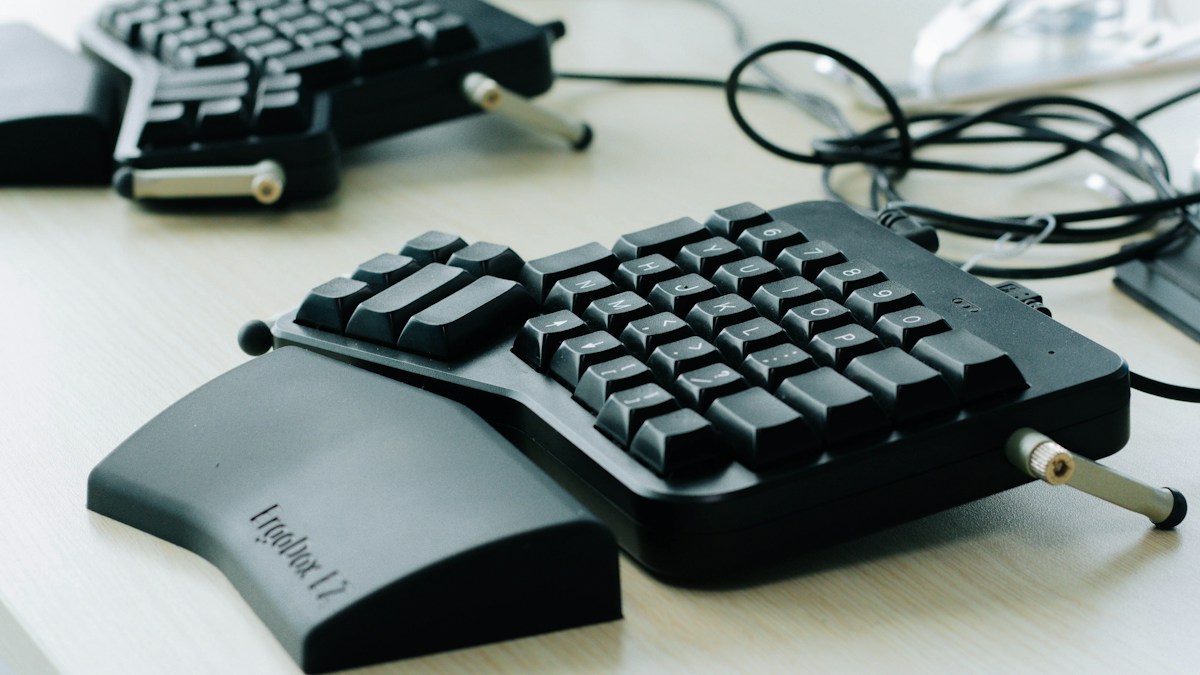
Why traditional mechanical typewriter stagger is obsolete: straight grids versus anatomically curved finger columns.
The Mechanical Typewriter Legacy: The Accidental Stagger
The staggered layout of modern computer keyboards was invented in 1868 for the Sholes & Glidden mechanical typewriter to prevent metal typebars from colliding physically. There is zero human biological reason for keyboard keys to shift diagonally. This legacy layout forces your fingers to make unnatural lateral reaches to strike basic letters like B, Y, and P.
Ortholinear Matrix Layouts: Pure Cartesian Grids
Ortholinear keyboards arrange keys in clean, symmetrical vertical and horizontal grids (such as the Planck and Preonic). This reduces diagonal finger travel and simplifies key navigation. However, because human fingers are of unequal lengths (the middle finger is significantly longer than the ring or pinky), pure flat grids do not match hand anatomy perfectly.
Columnar Stagger: Conforming to Human Hand Anatomy
Columnar stagger keyboards (such as the Corne, Ergodox, and Dactyl ManuForm) preserve vertical column alignment, but shift each vertical column up or down to match the exact natural reach of your individual fingers. The pinky column is dropped lower, eliminating painful over-reaching and pinky strain.
Technical Specifications & Reference Matrix
| Layout Architecture | Finger Reach Mechanics | Pinky Finger Stress | Adaptation Period |
|---|---|---|---|
| Legacy Row Stagger | Diagonal awkward reaches | Severe over-extension | Zero (Standard habit) |
| Ortholinear Grid | Pure vertical/horizontal | Moderate reach reduction | 3 to 5 Days |
| Columnar Stagger (Corne) | Anatomically curved columns | Minimal pinky fatigue | 7 to 10 Days |
| 3D Contoured Dactyl | Cupped concave keywells | Near-zero finger travel | 10 to 14 Days |
💡 Expert Field Recommendation
Take a blank piece of paper and press your hand flat with relaxed, naturally curled fingers. Notice how the tips of your fingers form a curve rather than a straight line. Choose a columnar stagger board that closely mirrors your hand curvature.
Diagnostic Troubleshooting Checklist
- Accidentally hitting C when aiming for V on columnar board: Muscle memory compensating for legacy diagonal row shifts. Keep fingers strictly in their home columns.
Frequently Asked Questions
Do columnar keyboards increase typing speed long term?
Most users achieve equal or slightly higher typing speeds (5% to 10% faster) due to reduced finger travel, but the primary benefit is an 80% reduction in finger fatigue over 8-hour workdays.
Article researched and verified by Nolan Drake, dedicated technical specialist and editorial contributor.
